15 min read
Context Engineering · AI Engineering
Your AI Says It Read the File. Did It?

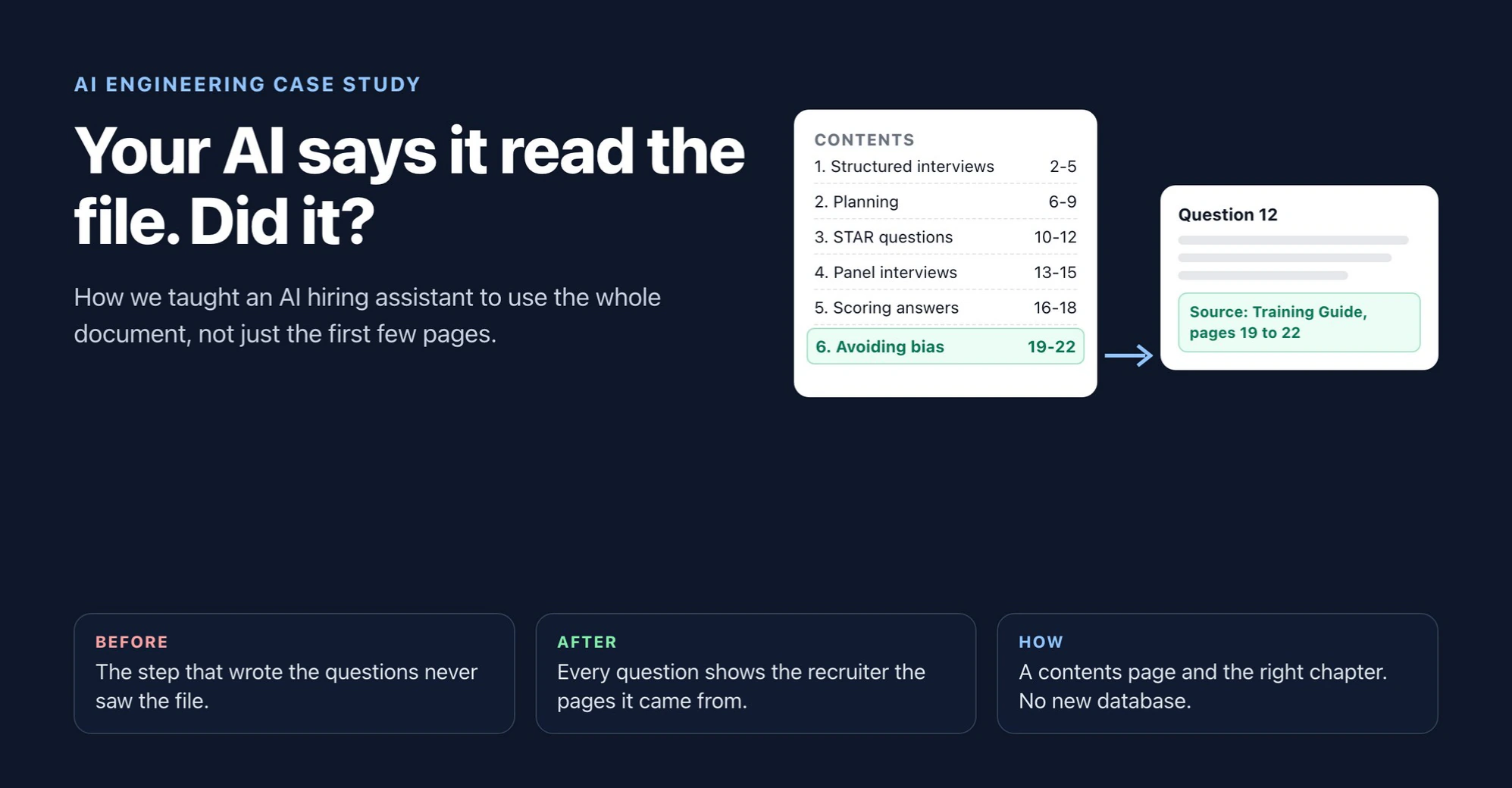
A recruiter attached a training guide of about 30 pages to our AI hiring assistant and asked for interview questions "based on the attached content". The assistant produced a tidy set of questions. They looked professional. None of them came from the guide.
The recruiter asked again. Nothing changed.
The AI wasn't ignoring the file. It never received it. This was a context engineering problem, not a model problem. Context engineering means making sure an AI gets the right information, at the right moment, in the right amount.
Client, product, AI provider and model names are left out on purpose (NDA).
 (opens the full-size image)
Why "use the attached document" wasn't the fix
The assistant is part of an AI hiring assessment platform I built. Recruiters use it to create screening questions through a simple chat: type "make 10 questions for a customer service role", attach a job description, then shape the result in plain words such as "make it harder".
Recruiters live in documents: training guides, policy handbooks, job descriptions, course material. "Here is our guide. Make questions based on it" is one of the most natural requests they make.
The tempting fix was a firmer prompt: "Use the attached document." I didn't do that. When an AI seems to ignore something, the better first question is simpler: did it ever receive it?
Getting this wrong has a cost. Questions that ignore the guide must be rewritten by hand, or worse, nobody notices. Candidates get tested on material they were never taught. And when an AI tool confidently ignores what you gave it, people stop giving it anything.
We followed the file like a parcel
I debugged this with Claude Code as my partner. I described what the recruiter saw, and we traced the guide through the system step by step, the way you would track a parcel: where it was read, where it was stored, and which steps could see it. It read the code faster than I could alone. I decided where to look next and what each finding meant.
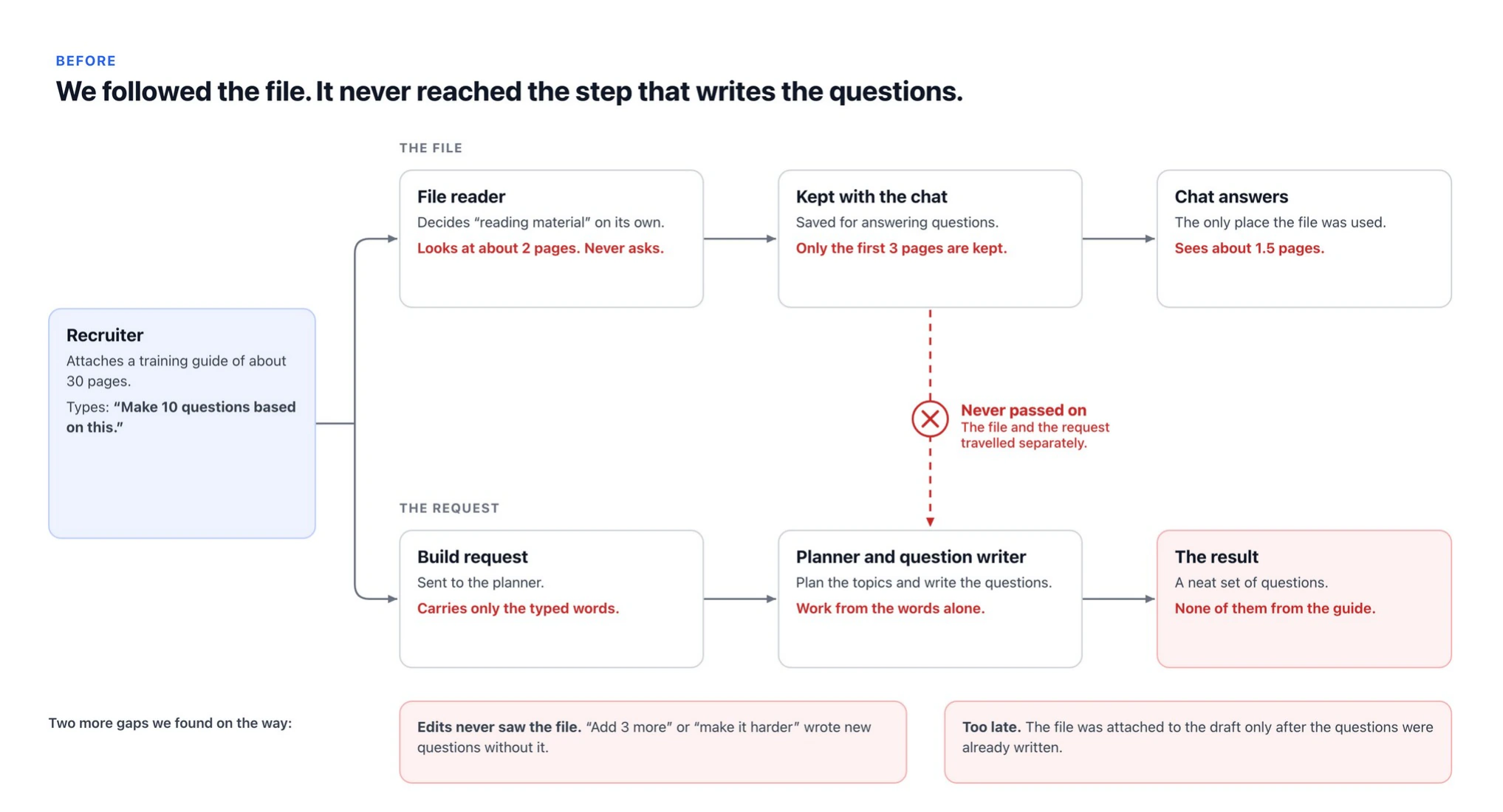
Behind the chat, a planner decides the topics of the test and a question writer writes the questions. The first finding: the file and the request travelled on separate paths. The file was stored with the conversation and used only to answer chat questions, while the request sent to the planner and the question writer carried only the typed words.
Even where the file was used, most of it was thrown away. Only about the first 3 pages were kept, and chat answers saw about a page and a half. In practice, a 30-page guide was a 3-page guide.
Edits like "add 3 more" or "make it harder" never saw the file, and the file was attached to the draft only after the questions had been written. On top of that, the system guessed silently: it looked at about two pages and decided on its own whether the file was reading material or a test to copy. Scanned files were always treated as a test.
 (opens the full-size image)
Many "the AI got it wrong" problems are really "the system never showed the AI" problems, and no change to the AI's instructions can fix those. When you see an AI not reading the whole document, check what actually reaches it first.
RAG vs long context: three ways to give an AI a long document
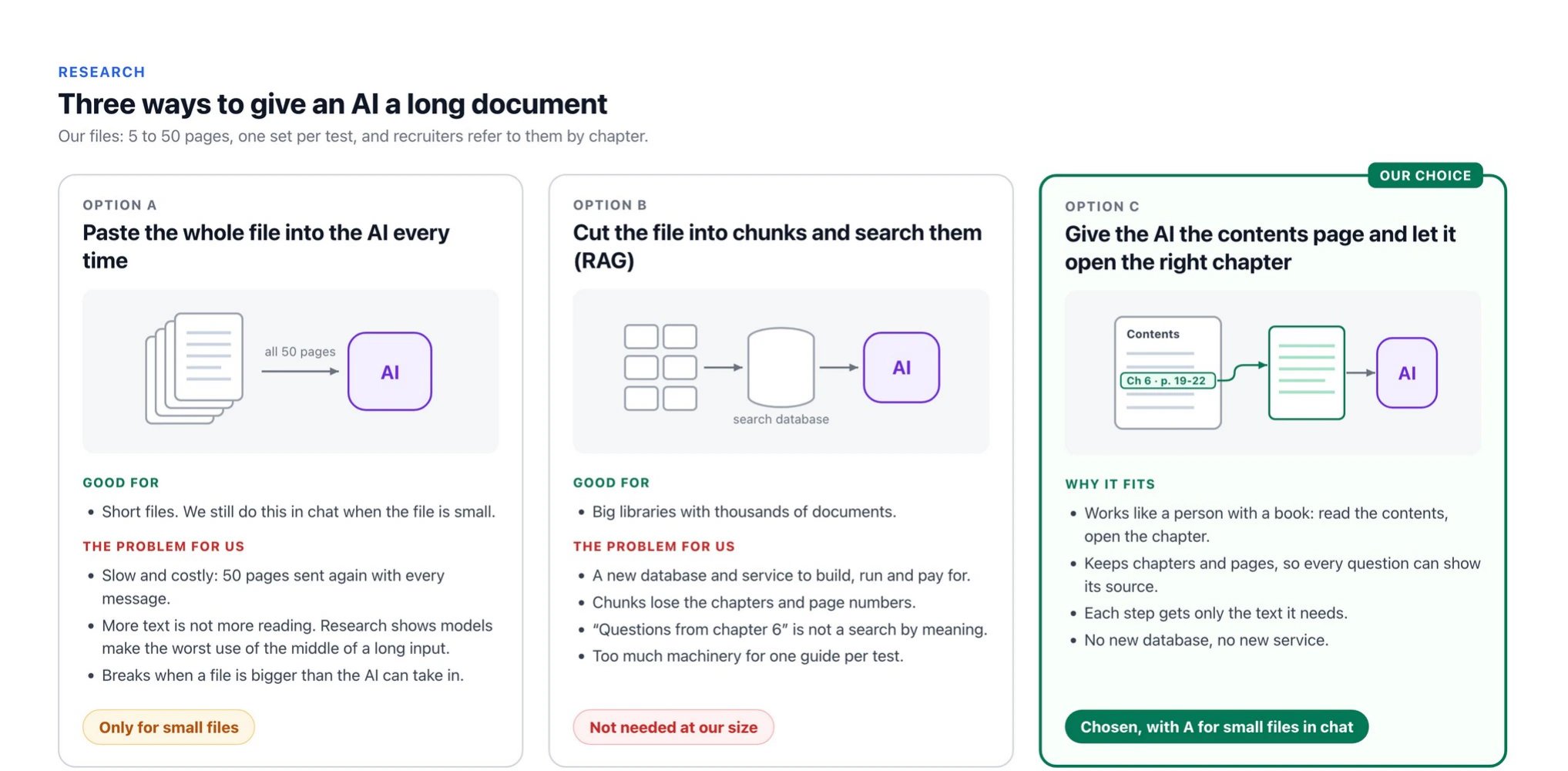
Before designing anything, we researched how the best AI assistants work with long documents. There are three common approaches.
Option A: paste the whole file every time
It is the simplest approach, and it works well for short files. For a 50-page guide, it means sending the same 50 pages with every message, which is slow and costly, and very large files go beyond what the AI can take in at once.
More text isn't more reading, either. The Lost in the Middle study by Liu and colleagues (2023) found that language models make the best use of information at the start and end of a long input, and the worst use of what sits in the middle.
Option B: chunk it and search it (RAG)
RAG, short for retrieval-augmented generation, cuts documents into small pieces, stores them in a search database, and passes the AI the pieces that look most related to each request. It is the right tool for large libraries with thousands of documents.
For us it was the wrong size: a new database and service to build, run and pay for, and chunks that lose the chapters and page numbers. And "questions from chapter 6" is about structure, not meaning, which a search by meaning handles poorly.
Option C: give the AI the contents page and let it open the right chapter
This is how a person uses a book, and how leading AI assistants and coding agents handle files too big to read at once: keep a short map of what exists, and open only the part you need, when you need it.
Our situation decided it
Recruiters attach PDF and Word files of 5 to 50 pages, sometimes more, and each file belongs to one test, so nobody needs to search a library. They think in chapters ("use chapter 6") and need to check where a question came from. I also wanted no new infrastructure.
Option C fit every point, which made it the right RAG alternative here. I kept Option A for one case: when the attached files are small (about 20 pages in total), the chat simply gets the full text.
 (opens the full-size image)
The context engineering fix: read it like a book
I designed the new reading flow around seven principles. Each one answers a failure we found.
 (opens the full-size image)
1. Ask, don't guess
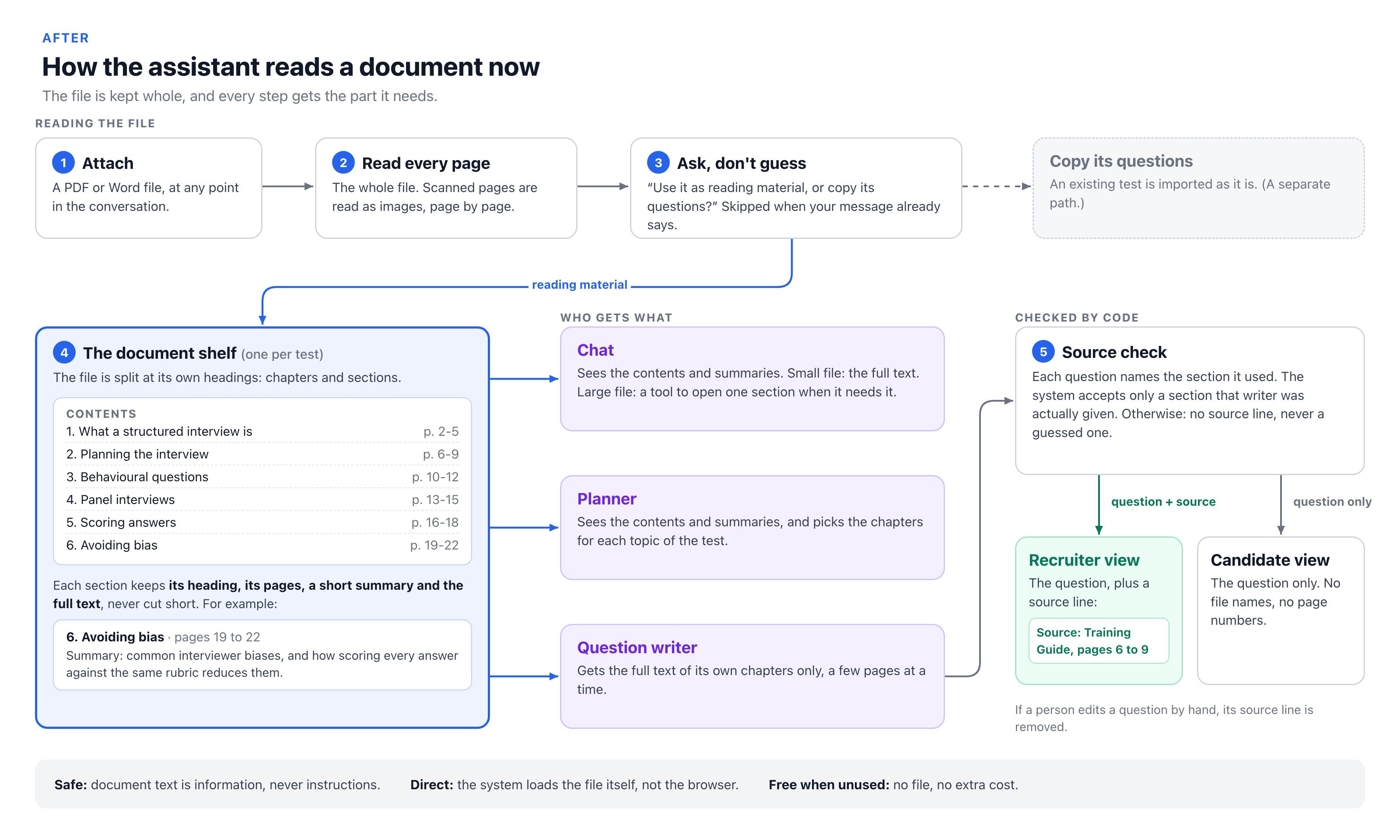
When a file is attached, the assistant asks whether to use it as reading material or copy its questions into the test, with its best guess as the first button. It skips the question when the message already says what to do, because a silent wrong guess is how this problem started.
2. Keep the whole document in its own structure
The file is read in full, scanned pages included, and split at its own headings into chapters and sections under a contents page. Each section keeps its heading, pages, a short summary and its full text, because a document's own structure is free information: it is how the author organised the knowledge, and how recruiters talk about it.
3. Give every step the part it needs
Chat sees the contents and summaries and can open one section when needed, so "what does the guide say about panel interviews?" works even when the answer is on page 40. The planner picks chapters from the contents, and the question writer reads the full text of its own chapters only, so no step gets text that would distract it or waste money.
4. Let the system fetch the file itself
The screen now sends a reference instead of the document's text, and the server loads the document itself. The file can't get lost between steps, and large documents don't travel back and forth.
5. Show the source and never guess it
Each question records the section and pages it came from, and the system accepts that only if the question writer was actually given that section. Otherwise there is no source line, never a guessed one, and a question edited by hand loses its source line. That is my rule for document grounding: a source you can't trust is worse than no source.
6. Keep sources away from candidates
Sources are stored apart from the questions and shown only to recruiters, and questions are written not to name the file or a page, or copy long passages. Candidates should be tested on understanding, not on spotting a quotation.
7. Say it in plain words
After every change, the system, not the AI, writes one sentence about where the new questions came from, such as "Your guide doesn't cover workplace ethics, so these questions are general." Recruiters should never have to guess what the AI did with their file.
Two more decisions
Once a test is built from a document, later edits keep using it, and new questions go to the chapters with the fewest questions so far. "Stop using the guide" turns it off. And text inside a document is treated as information, never as instructions, which protects against files written to steer the AI.
What I deliberately did not build
A document library shared across tests, a search database, a new AI service, and source lines for candidates. Each would have added cost or risk without solving the recruiter's problem.
How I used Claude Code as a thinking partner, not an autopilot
I worked on this with Claude Code, the AI coding assistant I build with (not the AI inside the product). It was my partner for debugging, research and building, and the split between us stayed clear.
For debugging, I asked one question before touching any prompt: did the AI ever receive the file? A firmer instruction changes nothing if the file never arrives. That is how I use AI-assisted debugging: I set the direction, and the tool does the fast reading and tracing.
For research, a simple prompt got the obvious answer: give the model the full document, or add RAG. So I changed the question. I asked it to think as an expert AI platform engineer who specialises in managing context, defined the problem, and added my constraint: sending the whole document creates problems of its own, so context, speed and efficiency all had to be managed. Then I had it research how leading assistants such as ChatGPT and Claude work with long documents, and challenge my thinking. That research led to the contents-page design.
For building, it was AI pair programming. It helped implement and test the fix, including the checks that keep sources away from candidates. The design calls were mine: no search database, sources checked by code, and asking instead of guessing.
The split is simple. AI is fast at reading, searching and writing code. I own the questions, the judgment and what ships.
The result
| What changed | Before | After |
|---|---|---|
| What the question writer saw | Only the typed request | The full text of the right chapters |
| How much of the file was kept | About the first 3 pages | The whole document, split into chapters |
| "Add 2 questions from chapter 6" | No way to point at a chapter | 2 questions from chapter 6 |
| Where a question came from | Unknown | Pages shown to the recruiter, checked by code |
| A topic the guide doesn't cover | Written silently, as if from the guide | Written as general, and labelled as general |
| What happened to the file | Decided silently from 2 pages | The assistant asks, or follows your words |
| What candidates see | The question | The question only: no file names, no pages |
When I repeated the recruiter's original request with a guide of about 30 pages, the assistant produced a plan naming the guide in under a minute, then 10 questions spread across its chapters in under 30 seconds. Every question showed its page range, and every range matched the chapter the question was about.
The follow-ups worked too. "Add 2 questions from chapter 6" added 2 questions from chapter 6. A request for questions on workplace ethics, which the guide doesn't cover, produced 2 general questions and said so. After "Stop using the guide", new questions came without source lines, and the assistant said that too.
Recruiters now get questions grounded in their own material and can check any question's source at a glance: less rewriting, more trust. Candidates are tested on the training they were actually given, without seeing file names or page numbers. The business got this with no new database or service to run, chats without a file cost nothing extra, and the same foundation supports future tests built from course material.
For engineers: the details
- Storage: two tables. Documents hold the owner, file name, page count, a one-line summary and the contents. Sections hold the heading, pages, full text and a short summary. Every read is scoped to the organisation and the current test.
- Splitting: PDF text is read page by page and split at headings (numbered or short title-case lines). Word files use their heading styles first. Sections under about 300 words are merged, and sections over about 3,000 words are split at paragraph breaks.
- Summaries: a fast, low-cost model writes one or two sentences per section, several sections per call, in the document's own language.
- Chat: contents and summaries always. Full text when the whole shelf is under about 60,000 characters (about 20 pages); otherwise a read-section tool that can only reach the current test's shelf.
- Question writer: the full text of its assigned sections, up to about 12,000 characters per call. Each question returns the id of the section it used, and an id outside the given set is rejected.
- Sources: a separate table, joined only by the recruiter's draft view. Automated checks confirm the field never appears in any candidate or employer response.
- Limits: up to 100 pages per text file and 5 files per test. Over a limit, the recruiter gets a plain message naming the limit.
- Safety: document text, summaries and tool results are fenced and scanned as untrusted input before they reach any prompt.
- Rollback: the previous path stays available behind a setting.
What I learned about context engineering
- When an AI ignores something, first check whether it ever received it.
- More text is not more understanding. Give each step the right part, not all of it.
- You may not need a search database. A document's own structure (headings, pages, a contents page) is free and often enough.
- Let code guarantee what matters. The AI suggests a source, and code checks it. The AI writes questions, and code writes the sentence about where they came from.
- Ask when a wrong guess is costly, and skip the question when the user has already answered it.
- Tell people what the AI did, in plain words. Trust comes from visibility.
AI products rarely fail because the model isn't smart enough. They fail when the model isn't shown what it needs. That is the heart of context engineering: fix the plumbing first.
I reached the same conclusion from a different direction in another case study on taking AI off the critical path, where the problem was also the system around the AI, not the model.
FAQ
Why does AI ignore the document I attached?
Often it never received it. The file may be stored somewhere the AI step can't see, or cut down to the first few pages. Check what actually reaches the model before changing the prompt.
What is context engineering?
Making sure an AI gets the right information, at the right moment, in the right amount. In this case it meant giving each step only the chapters it needed, with page numbers attached.
Do I need RAG for long documents?
Not always. RAG fits large libraries with thousands of documents. For one document per task, a contents page and section-by-section reading can be simpler, cheaper and keeps page numbers.
What is the "lost in the middle" problem?
Research by Liu and colleagues (2023) found language models use information at the start and end of a long input best, and information in the middle worst. Sending more text doesn't mean the model reads more.
How can users trust where AI-generated content came from?
Record the source for every output and let code, not the AI, check it. In this system, a question only shows a source if it came from a section the AI was actually given.
How do you use Claude Code for debugging?
As a partner, not an autopilot. I describe the symptom, and Claude Code helps me trace data through the system and read code quickly. I decide where to look next, what the findings mean and what to change.
If you're building AI products on top of real documents and want the AI to actually use them, I'd be glad to help. Get in touch
I'm Muhammad Abdullah, a forward deployed engineer building AI systems for enterprise clients, with Claude Code as my everyday partner for debugging, research and building. More about my work